Rotates.org

June 26, 2025 - CodePen greatest hits pt. 1

I’ve always enjoyed short, snappy little projects that deliver a quick dose of dopamine, and I’m a big fan of CodePen as a way to exercise that ‘tinker and play’ attitude.

One of my earlier and more involved pens was the result of a thought: “What if 8-bit but open world?”. A great candidate seemed to be Jet Set Willy, and luckily there’s an absolutely excellent disassembly of the game available. It was fascinating to dive into the data and see how efficiently everything was packed in there while remaining pretty readable. Before the days of widespread fast and convenient compression, programmers just squeezed things down to the last bit.

I ended up writing various routines to process things in a way that looked true to the original, including figuring out how to parse the attributes (the way the Speccy encoded colour and more into 8×8 pixel blocks with a single byte) and generate all of the graphics, rooms and movement patterns.

It’s not complete unfortunately – the arrows and the rope swinging routine got the better of me at the time, but I still think it’s still a really cool little bit of nostalgia, and decently structured (for the time at least; this is pre-ES6 JavaScript).

Anyway, here it is in all its glory. Enjoy!

I quite like the big comment attempting to explain all the bitwise stuff:

    // The attribute format is a single byte containing 2x 1-bit values for flash and bright, then 2x 3-bit values for paper and ink
    // So the value 221 (binary 11011101) broken down becomes flash 1 (1), bright 1 (1), paper 011 (3) and ink 101 (5)
    // To extract these, we perform up to two operations:
    // 1. We perform a bitwise AND on the value with a bitmask of corresponding length for how many bits you want to extract - if 
    // we're looking for a boolean here (using a single bit in the mask), we can just coerce it with the !! operator as the outcome
    // will be zero for false and non-zero for true
    // 2. We perform a bitwise shift to the right so that the bits we're interested in are at far right side
    //
    // Examples:
    // To get the bright value (1 - true) from 221 (11011101):
    // 221 & 64 = 64  (binary: 11001101 AND 01000000 becomes 01000000)
    // !!64 = true    (binary: 01000000 is non-zero, so it becomes true)
    //
    // To get the paper value (3) from 221 (11011101):
    // 221 & 56 = 24  (binary: 11011101 AND 00111000 becomes 00011000)
    // 24 >> 3  = 3   (binary: 00011000 shifted right 3 times becomes 00000011)
    //
    // Quite a nice explanation of what you can do with bitwise operators can be found here:
    // https://developer.mozilla.org/en/docs/Web/JavaScript/Reference/Operators/Bitwise_Operators
    // 
    // P.S. I revised this whole intro in September 2020 as I realised I didn't understand bitwise operations as well as I should
    // have. Littered throughout this code are examples of the old inefficient method of "shift then and", as opposed to the
    // 'correct' way of doing things (especially for single bits). No doubt there's more on this for me to learn but it's good to
    // be honest.

I’ll write up a few more of these for other pens I’ve done if there’s any interest. Let me know in the comments or via one of my socials if you’d like to know more about any of these, or indeed anything else I’ve done!

December 5, 2021 - Archaos: beta 1

It’s been a while has it not?

Well, here we are near the end of 2021 and what do I have but… a beta release of Archaos! Yes, that’s right, the game I’ve been working on most of my adult life finally gets a public, playable release!

This iteration has taken just over a month from start to beta, and I’m pretty happy with where it is right now. There are of course bugs, inconsistencies, and annoyances, as well as some big missing features (computer opponents and multiplayer being the ones I feel most will point out) but I hope to address these in time.

If you want to play it now, you can do so here: https://www.rotates.org/archaos/2021/

It currently has no network multiplayer or computer opponents (things I plan on addressing in due time) and has some bugs and inconsistencies, but I’ve managed to have a decent amount of relatively ‘vanilla’ experiences now playing the game on my own.

The source code is also public, available at my Github: https://github.com/lewster32/archaos – please do feel free to report any bugs or requests features etc. on here, and I’ll do my best to get around to them.

Thanks for holding on there, it’s been a journey.

August 8, 2014 - Phaser Isometric plug-in

Recently, as part of my continued work on Archaos (yes, I’m still working on it, never fear!) I put together an isometric (well, axonometric to be a little less precise) renderer for Richard Davey‘s wonderful Phaser HTML5 game development framework. It’s got a nice adjustable axonometric projection helper, a simple and fast physics engine based on Phaser’s own bread-and-butter Arcade Physics, and it’s probably close to production ready. I deliberately kept the system simple, and the API as close to the existing Phaser API as possible to allow for quick adoption, and it plugs in pretty much seamlessly.

You can view the microsite I put together for it here, browse the repo (and maybe even if you feel like it, or spot some of my horrendous and inevitable broken maths, contribute) on GitHub here, view the API docs here, and I’ll also be posting some simple examples to demonstrate the various features shortly. Enjoy!

March 23, 2013 - Future proofing

For the last few weeks I’ve been adding in two very important systems to Archaos – namely real-time communications via TCP, and the use of a database back-end for the server. The first makes games much more responsive, and allows the server to inform connected players of actions as and when they happen. It will also pave the way for an exciting addition I have planned, which will (hopefully) combat the inevitable pacing problems that arise from typical turn-based games. If you want to know more about what I’m getting at, give this excellent article a read.

The database server, client and game server respectively.

The database server, client and game server respectively.

The second addition is a solid database-driven server. Until now, as a temporary solution I’d been storing all of the game data in a single file. When the server opened, it read all of the users and games from this file, and then stored all of the data in memory. If the data changed, the server would periodically save the entire file back to disk. The server would only write the data to disk if it had changed, and only once every so often – this kept writes to a minimum. The solution was fine for small scale testing, but it would not have scaled up well – quickly consuming all of the memory in the server machine, as well as being difficult to manage.

Now all of the data is stored on a mongoDB server in essentially the same format. The game server is then only responsible for the manipulation of the data, and not the storage and management of it. The game server itself is relatively simple in its approach; when a user sends an action, it loads the game, determines if the action can be performed, and if so what the outcomes are. It then saves the changed game back to the database and sends the actions to all of the connected players (which it does via TCP). The game server never keeps games, users, units or anything else in memory for longer than it needs to check or manipulate it. There are no special objects or instances; every function works only on the raw data. I may introduce some caching to reduce database operations later but at this stage the setup is fairly efficient.

So, I have what I feel is a solid base now, I’ve got some of the actions in and working (such as creating, joining and leaving games, unit movement and engagement) and now it’s just a case of writing the client-side stuff for the remaining actions, adding in the spell system and then getting it out there for public beta testing!

Look out soon for another post on the spell system and how I intend to tweak it to provide a more balanced start to each game.

February 21, 2013 - UI and the lobby

I’ve spent the last two months refactoring a lot of code, tidying up and making everything more manageable. I’ve also spent the time working on implementing a Feathers-based GUI so that the game works more like a game should (i.e. with an opening screen, the ability to select which game you want to play and so on).

I won’t lie, Feathers has been difficult to get my head around – it seems to be an excellent library once you’ve sussed it out, but it’s not well documented (relying mainly on examples rather than proper documentation, and leaving you to even look at the library’s code itself to figure some things out) and took me a long time to get comfortable with. The upshot is I now have a very nice, fast, flexible native-feeling interface to Archaos which will work the same on all platforms.

You can see a short video of me demonstrating it on my desktop below – and you’ll just have to take my word for it that it works just as well on a mobile device 😉

None of what you see here is mocked up – the games you’ve joined or created are being retrieved from the server, and their details are being displayed. The isometric mini-map shows a real-time view of the game, and will update even while you view it from the lobby.

More features will need to be added to make the lobby fully featured, such as an interface that allows you to add friends (and so see their newly created games and join them), the ability to sort and filter the games by various criteria and of course the ‘create new game’ screen itself, where you’ll be able to set things such as the board size, maximum number of players, round/turn lengths and so on.

One last thing – I had a discussion with one of my friends about Archaos and realised that the words I was using to describe various things didn’t make sense. Because of this conversation I’ve settled on the following:

  • Board: The rectangular grid upon which the game is played.
  • Unit: A piece on the board, be it a wizard, wall, creature or corpse.
  • Turn: An individual player’s ‘go’ – i.e. selecting a spell, casting a spell or moving his/her units.
  • Phase: The three distinct gameplay segments, consisting of spell selection, spell casting and unit movement. Technically a fourth non-playable phase happens after spell casting and before unit movement, in which gooey blobs and magic fire spread, magic wood and castles/citadels may disappear and so on. Other phases may be introduced with new game modes.
  • Round: One set of phases, beginning in Classic mode with spell selection, and ending after the last player’s turn in the unit movement phase.

This means that each round has several phases, and within each phase each active player has a turn. Not all phases force the players to take turns one after the other – the spell selection phase will allow all players to select their spells together, and the phase will only end when either all of the players have selected a spell (or cancelled) or the time runs out for that phase. The spell casting and movement phases that follow will work as normal, with every player taking their turn one after another in the correct order. Timers here will work on an individual’s turn, so each player will have (for instance) five minutes to cast their spell, before the game cancels their turn and moves on to the next player. The same goes for the movement phase’s turns. All of this will of course be configurable upon creation of a new game.

November 14, 2012 - Meet the cast

I’m happy (for now) with the performance I’m getting on all tested devices, and so I’ve spent the last few days on the units and visual tweaks. The coloured background is now back in (and more subtle, like the original concepts I posted before) and I’ve painstakingly redrawn each of the original creatures from the game, keeping as true to the originals as I can while injecting a bit more detail and colour variation.

Plenty for the blobs to eat…

One of the important factors for me is to give every unit a distinct presence. I’ve kept myself within a relatively small palette of colours, but tried to ensure that every unit is easily discernible. My first test had Hydras, Green Dragons, Gooey Blobs and to a lesser extent Crocodiles all looking very similar due to them using the same green. I’ve now varied the colours a bit to make the Hydra more yellowish, and given the Crocodile a tan belly. This will help when the board gets cluttered with units – especially given the isometric perspective which serves to make the board look even more hectic.

There are a few units I’m not entirely happy with at the moment – the Gryphon looks a little bit like a big goose or something, and needs to look more eagle-like. The Wall presented an interesting challenge and I decided it’d be best if I rendered it isometrically. I may yet do the same for the other large structural units too (i.e. Dark Citadel and Magic Castle).

The ‘classic’ unit set comprises 286 separate sprites, with separate sprites for left and right (because of the edge lighting always being on the right)  although some units end up with duplicates for various reasons; the Gorilla for instance, which looks the same from either direction – or the Vampire, whose cape blowing in the wind should always go in the same direction. An absolute godsend during this process has been TexturePacker – which has meant I’ve been able to quickly create, change and update a very optimised single sprite sheet with ease.

As well as these visual bits and bobs, the client now connects to the proper server (rather than a quickly hacked together server) and it can now manage multiple games. This means that I’m closing in on that first big milestone: a properly playable alpha version . Shortly after the game reaches playable alpha, I’ll be announcing my plans for beta testing.

November 11, 2012 - Optimisation

I’ve done an awful lot in the last week or so on Archaos. Primarily the focus has been on optimisation, as it quickly became apparent that as3isolib was simply not fast enough for the job at hand. This led me to explore the possibility of using Starling, a fantastic 2D-on-the-GPU framework, which tries to remain true to the standard AS3 display list as much as possible.

This of course meant I had to rewrite my entire render stack from the ground up. Bummer.

After a few days of building and tinkering with my own Starling-powered custom and very lightweight isometric rendering engine, the frame rates began to climb and climb. Today, after reading up on it a bit more, I’ve managed to get the game pretty speedy.

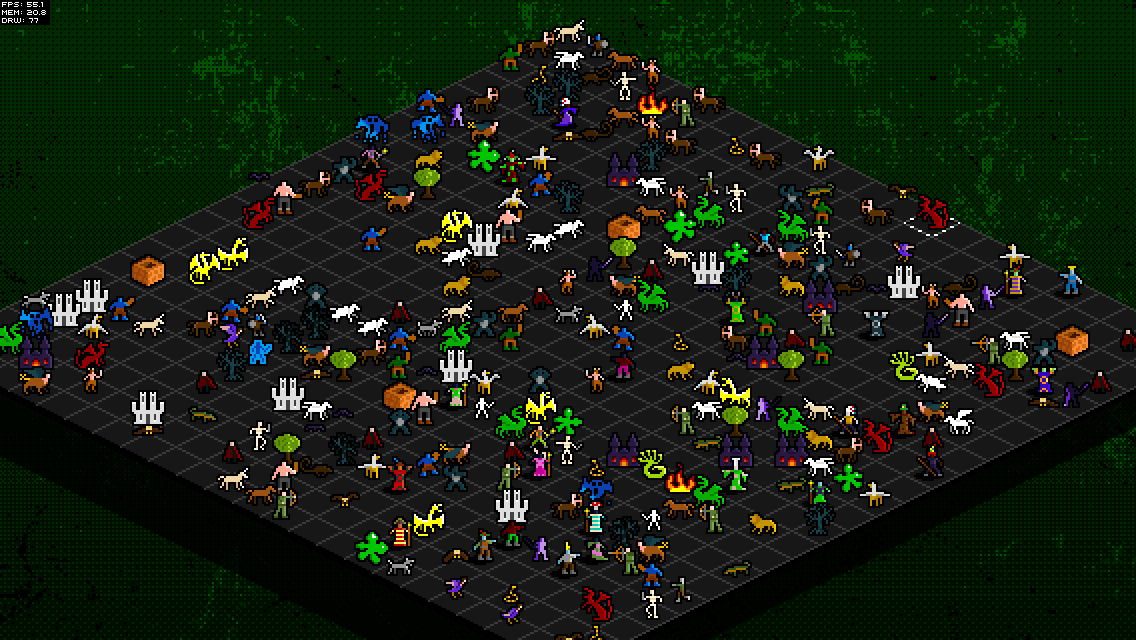
A whole lotta dragons

Above is a 200×200 board (that’s 40,000 squares) with approximately 20,000 animated, interactive golden dragons nodding away at just under 5 frames per second on my (admittedly pretty powerful) PC. Now this kind of test is pretty unrealistic, but it demonstrates what the engine is now capable of pretty well.

I’ve included further optimisations such as clipping (items off-screen are not drawn, which speeds things up considerably) and making use of a single ‘Texture Atlas’ for all of the units (basically a sprite sheet – gives a huge performance boost).

I’ve deployed some tests to my iPad 1 and my iPhone 4S and they’re running pretty nicely on both (my iPad is pretty much past it now but still churns the game out at a good 30-40fps) which makes me very happy indeed – especially in comparison to earlier last week when I deployed the as3isolib version to my iPhone and it ran at about 2fps!

I’ve also added other little visual touches and niceties (such as units jumping/flying between tiles rather than just sliding across) and have plans to add some really fun little things to make the whole experience of wizards and creatures fighting with one another all the more satisfying.

January 4, 2012 - Expressing my love

Over the last few days I’ve been planning, and then implementing the RESTful communication part of the server, and this has been built on top of Express‘s fantastic routing. The next few days will see me implementing the rest of the current game logic on top of this routing, using the HTTP GET and POST methods and simple URI schemes in order to provide any client with a stateless, efficient way of communicating with the server.

For example, a client could request ‘/games‘ from the server and receive a list of games, each with its vital stats (players, board size etc). A client can then request to see more on an individual game by requesting ‘/games/game01‘ for instance. A client can then finally choose to get the status of the game from a particular point via ‘/games/game01/update/20‘ which will return all the actions from action 20 and above, or alternatively the client can request ‘/games/game01/update/1325635230240‘ which retrieves the actions from after that timestamp. The server determines whether a request called for a timestamp or an action ID easily because of the huge numerical difference between the likely amount of actions in a game and the value of a typical timestamp.

I have also decided (for now at least) to focus on JSON as the primary format for data from the server – I had intended to explore other formats such as XML, BSON and MessagePack but keeping things in JSON seems to be efficient enough at the moment.

Once the server is returning everything correctly using this new URI structure, I’ll shift my focus to the client for a while, and get some of the boring stuff such as creating/editing users and access control sorted out. I’m being purposely very careful about having something solid and playable before I go and start with the spell phase, and all of the delightful things that brings with it!

Website and content © 2009–2026 Lewis Lane