Rotates.org

February 21, 2013 - UI and the lobby

I’ve spent the last two months refactoring a lot of code, tidying up and making everything more manageable. I’ve also spent the time working on implementing a Feathers-based GUI so that the game works more like a game should (i.e. with an opening screen, the ability to select which game you want to play and so on).

I won’t lie, Feathers has been difficult to get my head around – it seems to be an excellent library once you’ve sussed it out, but it’s not well documented (relying mainly on examples rather than proper documentation, and leaving you to even look at the library’s code itself to figure some things out) and took me a long time to get comfortable with. The upshot is I now have a very nice, fast, flexible native-feeling interface to Archaos which will work the same on all platforms.

You can see a short video of me demonstrating it on my desktop below – and you’ll just have to take my word for it that it works just as well on a mobile device 😉

None of what you see here is mocked up – the games you’ve joined or created are being retrieved from the server, and their details are being displayed. The isometric mini-map shows a real-time view of the game, and will update even while you view it from the lobby.

More features will need to be added to make the lobby fully featured, such as an interface that allows you to add friends (and so see their newly created games and join them), the ability to sort and filter the games by various criteria and of course the ‘create new game’ screen itself, where you’ll be able to set things such as the board size, maximum number of players, round/turn lengths and so on.

One last thing – I had a discussion with one of my friends about Archaos and realised that the words I was using to describe various things didn’t make sense. Because of this conversation I’ve settled on the following:

  • Board: The rectangular grid upon which the game is played.
  • Unit: A piece on the board, be it a wizard, wall, creature or corpse.
  • Turn: An individual player’s ‘go’ – i.e. selecting a spell, casting a spell or moving his/her units.
  • Phase: The three distinct gameplay segments, consisting of spell selection, spell casting and unit movement. Technically a fourth non-playable phase happens after spell casting and before unit movement, in which gooey blobs and magic fire spread, magic wood and castles/citadels may disappear and so on. Other phases may be introduced with new game modes.
  • Round: One set of phases, beginning in Classic mode with spell selection, and ending after the last player’s turn in the unit movement phase.

This means that each round has several phases, and within each phase each active player has a turn. Not all phases force the players to take turns one after the other – the spell selection phase will allow all players to select their spells together, and the phase will only end when either all of the players have selected a spell (or cancelled) or the time runs out for that phase. The spell casting and movement phases that follow will work as normal, with every player taking their turn one after another in the correct order. Timers here will work on an individual’s turn, so each player will have (for instance) five minutes to cast their spell, before the game cancels their turn and moves on to the next player. The same goes for the movement phase’s turns. All of this will of course be configurable upon creation of a new game.
December 4, 2012 - Chaos font

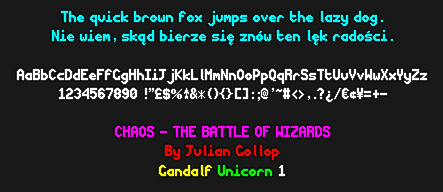
With the aid of @andy_herbert, Pentacom’s online bitmap font maker and CR8 Software’s Type Light, I’ve managed to create a crisp OpenType version of the font from the original Chaos, with a few tweaks and the addition of a (nearly) full latin and eastern European character set.

Pardon my Polish…

I’m not sure yet whether or not this font will go into Archaos however I’m happy to provide the font free for all to use as they wish – though giving Julian Gollop credit for the design of the original font would be encouraged, naturally.

Anyway, you may download the font below.

Chaos Sans v1.0

December 1, 2012 - Spells!

Question is, can you name them all?

Above are 51 spell icons rendered in glorious colour, and in no particular order. The borders are colour coded to help identify their type and use, though when implemented into the game, they will also come with a name, description and stats where necessary.

The alpha now has (nearly) full combat and movement, so the next step will be adding the spell phase. With a bit of luck this should happen in the next day or two, after which a very nearly full game can be played.

November 27, 2012 - The ultimate Chaos creature infographic!

I’d love to share this little stroke of absolute genius from one of Archaos’s longest serving (and thus longest suffering) fans – and incidentally a very talented programmer in his own right and major Chaos buff:

Click the image to view the huge (7680 px wide) original

@andy_herbert has painstakingly put this ‘cheat sheet’ of all of the original game’s units together showing graphics, stats, movement and combat ranges for each one, and grouping them together into this attractive infographic. I think it’s wonderful, and I’m going to print a large version of it out for my wall to use during testing!

Alpha is now under way with a small number of testers. So far we’ve played a few furtive ‘games’ (in the loosest sense – no casting, no ranged combat yet!) and apart from a few silly bugs, all seems to be well. I’m putting the finishing touches onto the standard movement/combat model in the next day or two (including finally adding ranged attacks) and then I’m going to implement casting.

Casting brings with it the somewhat-more-complex-than-it-seems matter of the user interface – which of course is critical to any game and which if not implemented correctly can really hinder this game. The interface in Archaos has to be intuitive, compact, and it has to get out of the way when you’re trying to play the game itself. As a cross platform mobile and desktop game, the way a player will interact with the game will differ slightly amongst platforms, however I want to ensure that the differences aren’t too jarring, and that each platform plays to its own strengths.

One of the methods to improve the experience is the use of gestures, so a player can pan and zoom the map intuitively, like they’re used to – and it may also through testing lead to methods of reducing the chance of accidentally performing an action, such as by having a user tap and hold on a unit or tile and then drag outside of a circle in order to perform the action (to ensure that the unit or tile tapped is the intended target, and that the user hasn’t just accidentally tapped the screen somewhere).

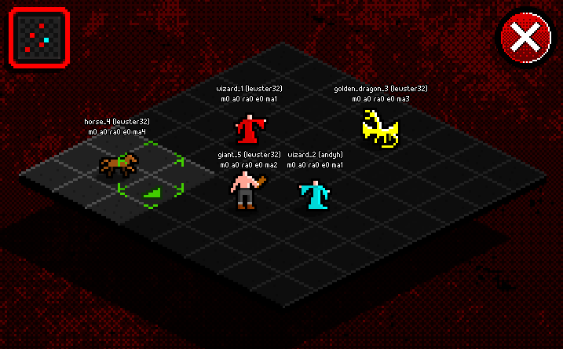
As I realise people like to see screenshots of progress as well as words, here’s a view of a typical alpha testing game session (with debug data above the units) showing the newly added window bezel to the mini-map, which is the basis of the UI, as well as the new ‘volumetric’ cursors and the big ‘cancel’ button.

My horse prepares for its gallop towards the hopelessly outnumbered cyan wizard


November 20, 2012 - Alpha details and a matter of originality

The client now connects to the server, downloads a list of games and then can connect to any individual game and begin interacting with the server, sending moves and updating the clients as the game progresses.

From a technical standpoint, the ‘netcode’ is fairly simple; when a client connects to a game, a snapshot of the game with all of the relevant data (position and status of units, players, whose turn it is etc etc) is delivered to the client which then sets the board up accordingly. The client then starts either polling via HTTP or listening via TCP (how this is chosen I have yet to decide) for new ‘actions’.

Not related to post: The unadorned mini-map – and yes, units now cast shadows. The shadows stay on the ground when they move too! Like proper shadows! I am so smart.

Actions represent every possible individual step which influences the game state in some way; a player joining or leaving during pregame, a unit moving, a new turn, a player being defeated or the game ending. Each action has both a timestamp and a consecutive action number. This means that all the client has to do is keep a record of which action number it’s up to, and wait for new actions. When new actions come through, the client processes these new actions in turn until it’s up to date with everyone else.

Because of the added complexity of creating a game which works over the Internet, some slight changes have crept into the gameplay, though these will be mitigated to keep the game as pure as possible. One such change is the way that individual units’ moves are processed.

In original Chaos, when you move a unit, after it has moved, it may then perform an attack (if it moves adjacent to a combat-capable enemy unit) or a ranged attack (if appropriate). These potentially up to three components of each unit’s ‘move’ are all typically linked together. With Archaos, a player may move their unit, and then lose connection, their PC may crash, the boss may come in – whatever – the point is they may be interrupted. In this case, with the traditional system there’d be two choices – either to automatically ‘end’ that unit’s move completely (which seems a tad unfair) or invalidate the unit’s move (not really practical).

The solution therefore is for the client and the server to track the move/attack/ranged attack phases as just that, distinct phases of the move. That way, if a unit moves but doesn’t get to perform its attack or ranged attack, clicking on it later in the same turn would allow you to continue its remaining phases.

Of course, this differs from Chaos and I’m always acutely aware of things which differ from what is both in my mind and the minds of most of its fans a well balanced and perfectly fine game. With that in mind, what I can do to ensure the gameplay remains (mostly) original is to automatically call the attack/ranged attack routine in the client after each unit’s movement phase. If the player then actively cancels one or both of these phases, they are marked as ‘complete’ and the unit’s move ends completely. Action or cancellation will be made mandatory on the client, so that the only time when the option to ‘revisit’ a unit will be available is if the move is cut short in some way. This does mean that players could potentially quit out of the game in order to bypass cancellation, but as there are no benefits I can see to doing so, it means that this feature can do its job without interrupting gameplay.

The game is now quite close to the alpha stage – that is it will be in some way playable very soon. The alpha will almost certainly begin by the end of this week, or the weekend at the latest (unless I run into some catastrophic game-breaking bug) and will feature a comparatively small subset of gameplay to begin with:

  • Users will be creatable
  • Games will be creatable (with the ability to set a width and height of the board – wizards will be spaced around the board as in the original game dependant on number of players)
  • Games can have up to 8 players and can be limited to fewer players if the player wishes
  • Players will be able to move units around the board, attack one another and cast basic creature units
  • Players will be able to defeat other wizards and win the game
  • Players will not be able to cast non-creature spells
  • Wizards will not be able to mount creatures such as horses etc
  • Animations for things such as spell casting, attacking, ranged attacking and wizard deaths will not be implemented at this stage
  • There will be bugs, crashes and weirdness – this is an alpha remember!

I will make further announcements about the alpha during the week on Twitter. I will be looking for volunteers to help me test the game and iron out any issues with what is essentially the core gameplay mechanic. It won’t be a particularly amazing experience at this stage (not compared to the original game or the final product, or even the subsequent beta) but it will be essential to test it on a range of hardware, and in a range of conditions.

As Archaos is already multi-platform ready, I will be able to create iOS and Android builds for those alpha testers who would like to try it on their iPhones and iPads. If this is the case, I’ll provide further instructions on what you need to do to get Archaos running on those devices. I’ve not yet tested Archaos on Android but I will at some point this week before I start alpha.

If you’d like to be part of the alpha phase, and have read all of the above and realise that you’ll be testing a limited and unfinished product, leave a comment below or drop me a line on Twitter.

November 14, 2012 - Meet the cast

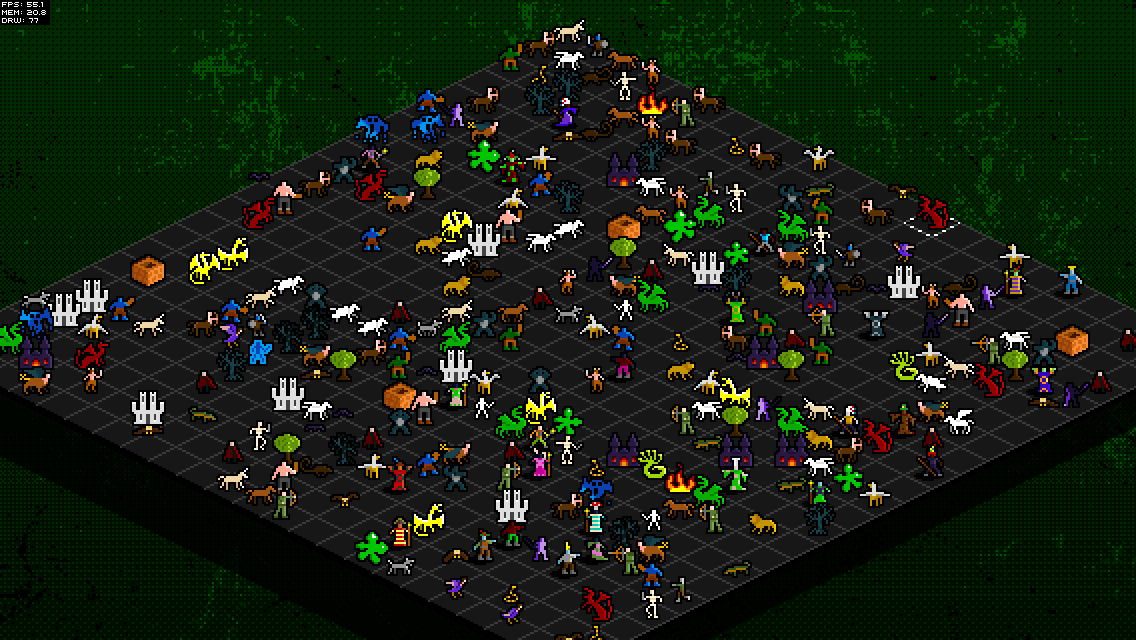
I’m happy (for now) with the performance I’m getting on all tested devices, and so I’ve spent the last few days on the units and visual tweaks. The coloured background is now back in (and more subtle, like the original concepts I posted before) and I’ve painstakingly redrawn each of the original creatures from the game, keeping as true to the originals as I can while injecting a bit more detail and colour variation.

Plenty for the blobs to eat…

One of the important factors for me is to give every unit a distinct presence. I’ve kept myself within a relatively small palette of colours, but tried to ensure that every unit is easily discernible. My first test had Hydras, Green Dragons, Gooey Blobs and to a lesser extent Crocodiles all looking very similar due to them using the same green. I’ve now varied the colours a bit to make the Hydra more yellowish, and given the Crocodile a tan belly. This will help when the board gets cluttered with units – especially given the isometric perspective which serves to make the board look even more hectic.

There are a few units I’m not entirely happy with at the moment – the Gryphon looks a little bit like a big goose or something, and needs to look more eagle-like. The Wall presented an interesting challenge and I decided it’d be best if I rendered it isometrically. I may yet do the same for the other large structural units too (i.e. Dark Citadel and Magic Castle).

The ‘classic’ unit set comprises 286 separate sprites, with separate sprites for left and right (because of the edge lighting always being on the right)  although some units end up with duplicates for various reasons; the Gorilla for instance, which looks the same from either direction – or the Vampire, whose cape blowing in the wind should always go in the same direction. An absolute godsend during this process has been TexturePacker – which has meant I’ve been able to quickly create, change and update a very optimised single sprite sheet with ease.

As well as these visual bits and bobs, the client now connects to the proper server (rather than a quickly hacked together server) and it can now manage multiple games. This means that I’m closing in on that first big milestone: a properly playable alpha version . Shortly after the game reaches playable alpha, I’ll be announcing my plans for beta testing.

November 12, 2012 - iPad performance test video

Recorded a little video for posterity today to show how Archaos is running on an iPad 1 – as you can see, it’s very smooth and playable. There are still some optimisations I could make to the clipping code, but even with the current fairly inoptimal method of clipping, large boards such as 50×50 are perfectly playable on an original iPad.

November 11, 2012 - Optimisation

I’ve done an awful lot in the last week or so on Archaos. Primarily the focus has been on optimisation, as it quickly became apparent that as3isolib was simply not fast enough for the job at hand. This led me to explore the possibility of using Starling, a fantastic 2D-on-the-GPU framework, which tries to remain true to the standard AS3 display list as much as possible.

This of course meant I had to rewrite my entire render stack from the ground up. Bummer.

After a few days of building and tinkering with my own Starling-powered custom and very lightweight isometric rendering engine, the frame rates began to climb and climb. Today, after reading up on it a bit more, I’ve managed to get the game pretty speedy.

A whole lotta dragons

Above is a 200×200 board (that’s 40,000 squares) with approximately 20,000 animated, interactive golden dragons nodding away at just under 5 frames per second on my (admittedly pretty powerful) PC. Now this kind of test is pretty unrealistic, but it demonstrates what the engine is now capable of pretty well.

I’ve included further optimisations such as clipping (items off-screen are not drawn, which speeds things up considerably) and making use of a single ‘Texture Atlas’ for all of the units (basically a sprite sheet – gives a huge performance boost).

I’ve deployed some tests to my iPad 1 and my iPhone 4S and they’re running pretty nicely on both (my iPad is pretty much past it now but still churns the game out at a good 30-40fps) which makes me very happy indeed – especially in comparison to earlier last week when I deployed the as3isolib version to my iPhone and it ran at about 2fps!

I’ve also added other little visual touches and niceties (such as units jumping/flying between tiles rather than just sliding across) and have plans to add some really fun little things to make the whole experience of wizards and creatures fighting with one another all the more satisfying.

Website and content © 2009–2026 Lewis Lane